Task Management

Andrey Shcherbina
·
Updated on
A person reads yet another article about time management, gets inspired, buys an app for $10 a month, creates a detailed plan for tomorrow with 15-minute intervals. Morning starts according to plan. By lunch, the first urgent matter breaks the schedule. By evening, the plan is forgotten, the app gathers dust, and guilt about lack of discipline grows.
The problem isn't the person or the method. The problem is the "find the perfect system and life will sort itself out" approach. Time management isn't a magic pill. It's a set of tools from which you need to choose those that fit your tasks, personality, and real working conditions.
The mymeet.ai team works with professionals who stopped searching for the perfect system and started adapting working methods to themselves. Effective time management is built not on following others' rules but on understanding your own work patterns.
What Is Time Management and Why You Need It
Time management is often misunderstood. It's not about doing more tasks or filling every minute of the day. It's about conscious choice of what to spend limited attention and energy resources on.
Definition of Time Management
Time management is a set of techniques and principles for consciously managing your time, energy, and attention to achieve goals with minimal stress.
The key word is conscious management. You decide what to do, when to do it, and how much time to spend. Instead of reactive mode — "something happened, need to respond urgently" — you shift to proactive: "I planned this time for solving this task."
Time management includes three aspects:
Prioritization — what to do first, what later, what not to do at all
Planning — when to do it and how much time to allocate
Execution — how to do it effectively while avoiding distractions
Myths About Time Management
Myth 1: "You need to plan every minute." In practice, rigid schedules break from the first unexpected call. Good time management includes flexibility and buffer time.
Myth 2: "More tasks = more productivity." Closing 20 small tasks creates an illusion of productivity but doesn't move you toward goals. It's more important to complete 2-3 truly significant tasks.
Myth 3: "There's a universal system for everyone." The Pomodoro Technique works for a developer but may be useless for a manager with constant meetings. The method needs to be adapted to work specifics.
Benefits of a Systematic Approach to Time
People without a time management system work in reactive mode. An email comes — they respond. Someone calls — they get distracted. Someone asks urgently — they drop what they're doing. The day ends feeling like running around without results.
A systematic approach gives control. You know which tasks are critical, when you'll do them, how much time you need. Urgent matters don't throw you off because there's a buffer. Important projects move forward because time is protected for them.
Stress from feeling "need to do everything at once" decreases. When you see the plan, you understand — it's physically impossible to do 15 tasks today. You choose 3 key ones and do them calmly, instead of chaotically trying to get everything done.
Method 1 — Eisenhower Matrix (Urgent vs Important)
The most basic yet powerful prioritization tool. Helps distinguish what's truly important from what seems urgent.
How the Matrix Works
The matrix divides tasks into four quadrants along two axes — importance and urgency:
Quadrant 1 (Urgent and Important) — crises, deadlines, problems requiring immediate resolution. Do it immediately and yourself.
Quadrant 2 (Important but Not Urgent) — strategic planning, development, learning, problem prevention. The most important quadrant for long-term success. Schedule time specifically.
Quadrant 3 (Urgent but Not Important) — many calls, emails, meetings that seem urgent but don't move toward goals. Delegate or minimize.
Quadrant 4 (Not Urgent and Not Important) — distractions, procrastination, useless activities. Eliminate as much as possible.
Application Examples
A manager starts the morning sorting tasks. Production server crash — Quadrant 1, resolve immediately. Developing product strategy for the quarter — Quadrant 2, schedule time in calendar. Report request that an analyst can prepare — Quadrant 3, delegate. Scrolling social media — Quadrant 4, eliminate work time.
The key to effectiveness is increasing time in Quadrant 2. When you engage in prevention and planning, Quadrant 1 tasks decrease. Fewer crises, more control.
Method 2 — Pomodoro Technique (Focus Through Intervals)
A simple technique for fighting procrastination and maintaining focus. Work is broken into short intervals with breaks.
How the Technique Works
Pomodoro consists of cycles:
25 minutes of focused work on one task
5-minute break
After 4 cycles — a long break of 15-30 minutes
During the 25 minutes, you work only on the chosen task. No distractions — phone on silent, notifications off, browser closed. Just the task.
The technique works by creating an artificial deadline. 25 minutes is short enough that the brain doesn't resist starting. "Just 25 minutes, then a break" is easier to sell yourself than "now I'll work for 3 hours."
When Pomodoro Works Best
The technique is ideal for tasks you can do alone without depending on others. Writing code, design, writing texts, data analysis — anything requiring deep concentration.
Pomodoro works poorly for managers with constant meetings and unpredictable interruptions. It's hard to maintain 25-minute intervals when someone has a question every 15 minutes.
Adapt to yourself. Classic 25 minutes may be too short for tasks requiring deep immersion. Try 45 or 60 minutes with 10-15 minute breaks. The main thing is the work/break structure, not specific numbers.
Method 3 — The 1-3-5 Method (Day Structure)
A simple day planning technique that fights unrealistic expectations of your own productivity.
The Essence of the 1-3-5 Method
Each day you plan:
1 big task (requires 2-4 hours of focused work)
3 medium tasks (30-60 minutes each)
5 small tasks (10-15 minutes each)
Total 9 tasks per day. This is realistic for most people, considering the workday includes meetings, breaks, and unexpected issues.
The method fights overestimation of capabilities. When you write a list of 20 tasks for the day, you already know you won't complete them. This demotivates. With the 1-3-5 method, the list is achievable, giving a sense of progress.
How to Plan Your Day Using the Method
Do the big task in the morning when energy and concentration are at their peak. This is the main task of the day — if you only complete this one, the day is still productive.
Distribute medium tasks between meetings. After the morning meeting until lunch — one medium task. After lunch — two more medium tasks between calls.
Small tasks are fillers between large blocks. Reply to an important email, confirm a meeting, approve a document. Done in gaps, don't require dedicated time.
Method 4 — Timeboxing (Time Blocks)
Allocating fixed time blocks for different types of tasks in the calendar. Protecting time from spontaneous interruptions.
What Is Timeboxing
Timeboxing is a technique where you allocate a specific time block in the calendar for each task or type of task and work only on it during that time.
Not just a to-do item "write report," but a calendar event "Writing Report, Tuesday 9:00-11:00." This time is blocked, meetings can't be scheduled, you don't check email during it.
Timeboxing turns intentions into actions. "Should write that report" is easy to postpone. A calendar block "Report, tomorrow 9:00" works as a commitment to yourself.
How to Implement in Your Calendar
Start by protecting time for your most important work. If the main thing is strategy development, block 2 hours every Tuesday and Thursday morning. This is a sacred time for deep work.
Create blocks for different types of tasks:
Deep work (strategy, analysis, creation) — 2-4 hour blocks
Communication (email, Slack, calls) — 30-60 minutes 2-3 times a day
Meetings — group into specific days/times
Administrative tasks — 1 hour at end of day
Leave buffers between blocks. If blocks are back-to-back, the first one running over shifts everything else. 15-30 minutes between large blocks provides flexibility.
Method 5 — "Eat the Frog" Method (Hard Things First)
The principle of doing the most unpleasant or difficult task of the day first, while energy and willpower are at maximum.
Philosophy of the Method
The "frog" is the most important yet most postponed task. What brings the greatest value but what you don't want to approach. A difficult conversation with a client, writing strategy, refactoring code.
If you start the day with the frog, everything else goes easily. Psychologically, the day is already successful because the main thing is done. Energy is high because you haven't tired yourself with small stuff yet.
If you start with small things — answered 10 emails, made 5 calls, closed administrative tasks — by the time you reach the frog, energy is at zero. The frog gets postponed to tomorrow. And the day after. And it becomes bigger and scarier.
Why This Works
Willpower is a limited resource that depletes throughout the day. In the morning, it's easier to make yourself do something difficult. By evening, discipline is at zero, you only want easy and pleasant tasks.
Completing the frog gives momentum for the whole day. The feeling "I did what's important" motivates better than any technique. Other tasks go easier against this backdrop.
Method 6 — The Two-Minute Rule (Quick Tasks)
A simple rule for processing small tasks that prevents to-do list clutter.
The Principle
If a task takes less than 2 minutes — do it immediately, don't add to the list. Reply to a simple email, confirm a meeting, forward a document — all done immediately.
The reason is simple — adding a task to the list, then finding it, remembering the context, and doing it takes more time than just doing it right away.
The rule prevents accumulation of small things. Without it, the to-do list balloons to 50 items, half of which are 2-minute tasks. This demotivates and creates cognitive load.
When to Apply the Rule
Apply while processing incoming items — emails, messages, requests. Read an email, can respond in 2 minutes — respond immediately. Requires analysis or a long response — add to the list or block time.
Don't apply during deep work. If focused on an important task, don't get distracted by 2-minute items even if they can be closed quickly. Allocate special time for processing small things.
Method 7 — Task Batching
Grouping similar tasks and completing them in one block. Reduces context-switching costs.
The Essence of Batching
Switching between different types of tasks is expensive. Every time you switch from data analysis to responding to emails, the brain needs time to reconfigure. These costs add up.
Batching minimizes switching. Instead of responding to emails 10 times individually throughout the day, you allocate 1 hour and process all emails at once. Instead of 5 short calls at different times, you group them into one time block.
The brain works more efficiently on similar tasks. When doing 5 similar tasks in a row, you enter flow. The first task takes 10 minutes, the second 7, the fifth 5 — speed increases.
Examples of Task Grouping
Communication block — all emails, messages, short calls in one hour. 10:00-11:00 only communication, nothing else.
Creative block — all tasks requiring idea generation. Writing an article, developing a concept, brainstorming. Group in morning hours when creativity peaks.
Administrative block — approvals, reports, form filling, organizational tasks. Group at the end of day when energy for complex work is already depleted.
Meetings — when possible, group meetings on specific days or parts of the day. "Tuesday is meeting day" gives three days without interruptions for deep work.
Method 8 — The 80/20 Method (Pareto Principle)
Focusing on the 20% of tasks that produce 80% of results. Cutting the insignificant.
How the Principle Works in Time Management
The Pareto Principle states that 20% of efforts produce 80% of results. In time management, this means a few key tasks create most of the value.
The problem — we spend time evenly on all tasks without distinguishing critical from secondary. The result — lots of activity, little results.
Applying the principle:
Identify 2-3 tasks that will bring the greatest results
Allocate the best time and maximum resources to them
Do remaining tasks on a residual basis or not at all
Identifying the 20% of Tasks Producing 80% of Results
Ask yourself about each task — if I only do this task today, will the day be productive? Tasks where the answer is "yes" are your 20%.
Look at last month's results. Which 2-3 tasks or projects had the greatest effect on the business? More of those tasks. Which tasks took time but didn't produce results? Fewer of those.
Be ready not to do many things. The 80/20 principle is about refusing 80% of tasks that produce only 20% of results. Sounds radical but works. Better to do 2 key tasks excellently than 10 tasks mediocrely.
Method 9 — Time Blocking for Deep Work
Protecting large uninterrupted time blocks for tasks requiring deep concentration. Fighting workday fragmentation.
The Concept of Deep Work
Deep work is activity performed in a concentrated state without distractions that develops skills and creates value. Strategic thinking, complex analysis, writing code, creating content.
Shallow work is logistical tasks not requiring intense concentration. Responding to emails, status meetings, administrative tasks.
The modern workday consists of 80% shallow work and 20% deep work. To create real value, you need to flip this ratio. But deep work requires time — minimum 90 minutes of uninterrupted concentration.
How to Protect Time for Focus
Block 2-4 hour blocks in your calendar every day for deep work. This is a sacred time where meetings can't be scheduled, where you don't check email.
Communicate boundaries to your team. "From 9 to 12 I'm in deep work mode, available only for urgent questions." "Do Not Disturb" status in Slack, auto-reply on email, phone on silent.
Create physical conditions for focus. Noise-canceling headphones even in a quiet office signal to others. Close the door if you have an office. Find a quiet place if you work in an open space.
Starting small — one 90-minute block of deep work per day is already huge progress for most people. Then increase to two 2-hour blocks.
Method 10 — Weekly Review
Regular practice of analyzing the past week and planning the next. Keeping the system current.
Weekly Review Structure
Weekly review is dedicated time (usually 1-2 hours on Friday or Sunday) for summarizing and planning.
Review stages:
Clear inboxes — process all emails, messages, notes that accumulated
Review calendar — what happened this week, what's planned for next
Review projects — progress on key projects, what's stuck, what needs to move
Task lists — what's done, what's not, what to reschedule, what to delete
Plan the week — determine key tasks for the next week
What to Analyze and Plan
Analyze patterns from the past week. What took more time than planned? Which meetings could have been skipped? Which tasks do you constantly postpone?
Determine 3 main goals for the next week. Not 20 tasks, three goals. If by the end of the week these three goals are achieved, the week is successful regardless of everything else.
Check the balance of different task types. How much time went to deep work vs shallow? Too important vs urgent? Adjust planning based on this analysis.
Time Management Methods Comparison:
Method | What It Solves | Who It's For | Implementation Time | Combines With |
Eisenhower Matrix | Prioritization | Everyone | 1 day | All methods |
Pomodoro | Procrastination, focus | Developers, writers | 1 week | Time blocking |
1-3-5 | Realistic planning | Everyone | 1 day | Timeboxing |
Timeboxing | Protecting time | Managers, specialists | 2 weeks | Batching |
Eat the Frog | Postponing important | Procrastinators | 1 day | 80/20 |
2-Minute Rule | Accumulating small things | Everyone | Immediately | Batching |
Batching | Context switching | Managers | 1 week | Timeboxing |
80/20 | Focus on main things | Entrepreneurs | 1 month | Matrix |
Time blocking | Deep work | Specialists | 2-3 weeks | Pomodoro |
Weekly review | System maintenance | Everyone using a system | 2 weeks | All methods |
How to Choose a Time Management Method for Yourself
No universal method exists. Choice depends on work specifics, personality, and current time problems.
Diagnosing Time Problems
Identify the main problem before choosing a method. Different methods solve different problems.
Problem: "Can't start important tasks, keep postponing" → "Eat the Frog" method + Pomodoro to start
Problem: "Constantly distracted, no focus" → Time blocking for deep work + Pomodoro
Problem: "Many tasks, don't understand what's main" → Eisenhower Matrix + 80/20 principle
Problem: "Day fragmented by meetings" → Timeboxing + meeting batching
Problem: "To-do list balloons to 50 items" → 1-3-5 method + 2-minute rule
Combining Methods
Don't limit yourself to one method. Most effective systems are combinations of several techniques.
Example of a working system:
Eisenhower Matrix for task prioritization at the start of the week
1-3-5 method for planning each day
Timeboxing for protecting time in the calendar
Batching for grouping meetings and communication
Weekly review for keeping the system current
Implement gradually. Start with one method that solves the main problem. After a month, when it becomes a habit, add the second. Attempting to implement 5 methods simultaneously leads to abandoning all of them.
mymeet.ai for Optimizing Work Time
A significant portion of working time for many professionals goes to meetings — from 30% to 60% of the work week. After meetings, another hour to hour and a half is needed for documenting agreements, creating tasks, and sending summaries to participants.
mymeet.ai is an AI meeting assistant that automatically records, transcribes, and structures information from online calls. The system turns an hour-long meeting into a ready report with key moments, tasks, and agreements in minutes.
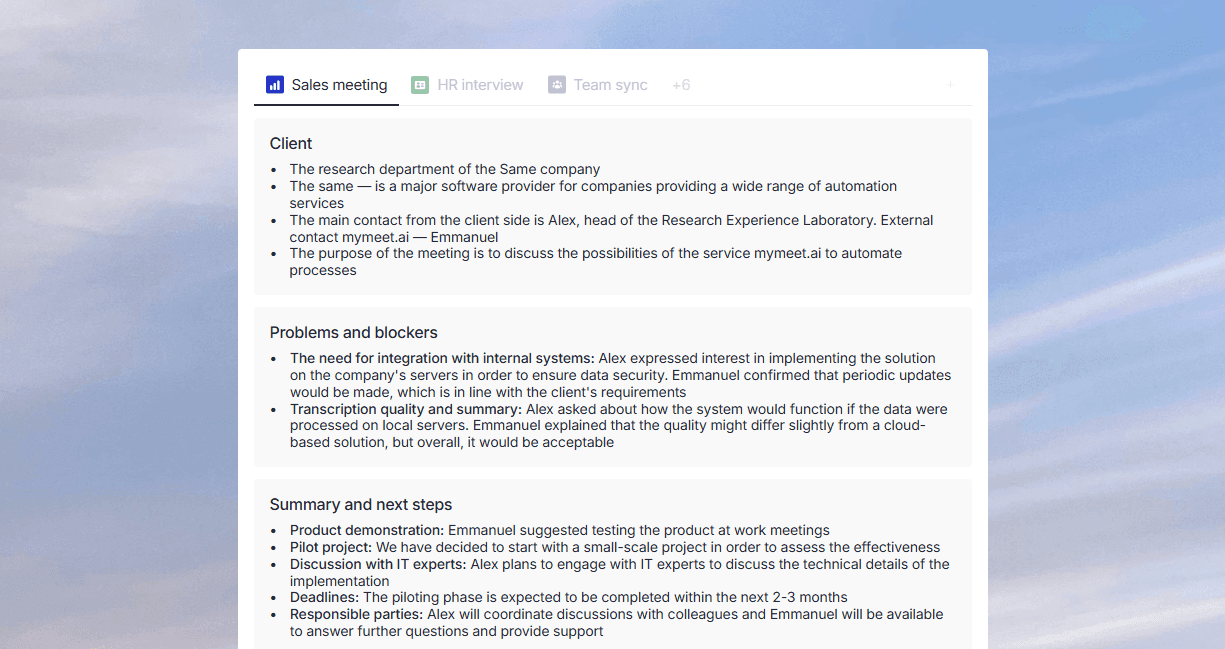
mymeet.ai capabilities for saving time:
✅ Automatic meeting processing — bot connects to video call, records, creates transcript and structured report without human involvement
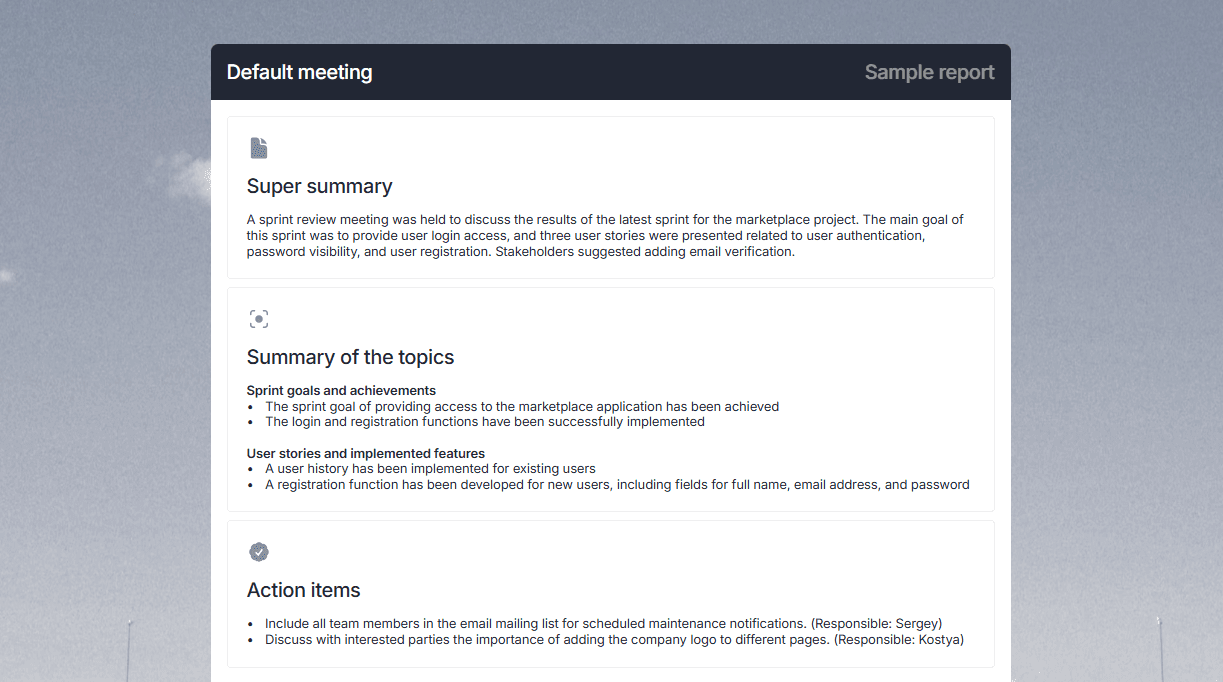
✅ Task and agreement extraction — AI finds all action items, identifies responsible parties and deadlines, creates a ready list for the tracker
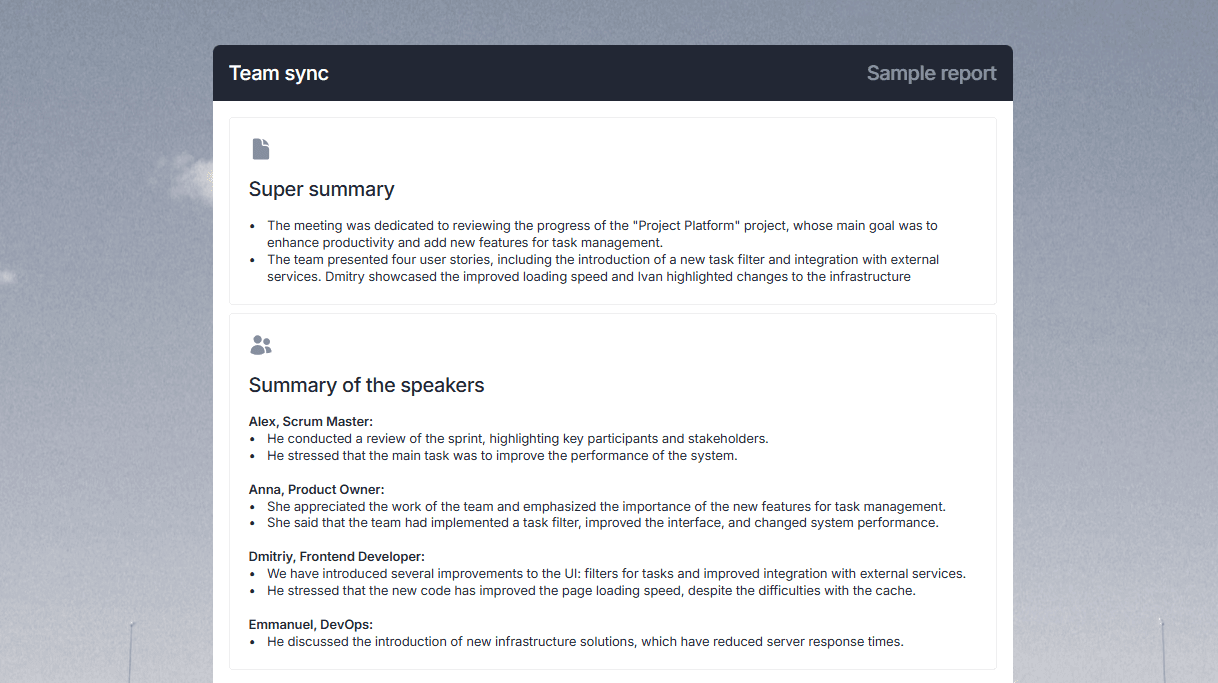
✅ Ready summaries for the team — instead of 30 minutes writing a protocol, you get a ready report to send to participants
✅ Time saved on meeting preparation — before a meeting, you can quickly review summaries of previous discussions instead of searching through notes
✅ Freedom from note-taking — in meetings you can fully concentrate on the conversation without getting distracted by notes
✅ Search for information from past meetings — you can ask the AI "what did we decide about project X" and get answers from all relevant meetings
✅ Meeting efficiency analysis — the system shows how much time goes to meetings, which topics repeat, where time is lost
✅ Integration with calendar and trackers — tasks automatically go to Jira/Asana, summaries are sent to email
Case Study: How an Executive Freed Up 10 Hours a Week
A product team leader conducted 15-20 meetings a week — team syncs, client meetings, planning sessions. After each meeting, he spent 20-40 minutes recording agreements, creating tasks, and sending protocols. Total of an additional 5-8 hours weekly just on documentation.
Implementing mymeet.ai automated the documentation. Each meeting automatically becomes a structured report with key moments and tasks. The executive only needs to review the report (5 minutes) and send it to the team.
Result: saving 8-10 hours per week, which the executive redirected to strategic work and deep analysis. Plus — nothing is lost from discussions, all agreements are recorded and tracked.
Common Time Management Mistakes
Knowing common mistakes helps avoid them. Most failures with implementing systems happen for predictable reasons.
Planning Every Minute
Perfectionist planning kills flexibility. A schedule with 15-minute blocks for the entire day looks impressive but breaks from the first unexpected call.
Reality — 30-40% of the workday goes to the unexpected. Urgent questions, unplanned discussions, tasks that took more time. A rigid plan doesn't account for this and creates a constant feeling of failure.
Plan 60% of time, leave 40% buffer for unexpected things and transitions between tasks. This is realistic and reduces stress.
Ignoring Energy and Attention
Planning only by time doesn't account for energy and concentration changing throughout the day. Scheduling complex analytics at 5 PM after 8 hours of meetings is a guaranteed failure.
Consider your rhythms. When is your energy peak — morning, afternoon, evening? When does difficult work come easily, when only routine? Plan accordingly — main things at peak time, routine when energy is low.
Lack of Buffer Time
Back-to-back meetings without breaks are a direct path to burnout. An hour meeting, immediately the next meeting, then another. By the end of the day, the brain is at zero.
Add 15-30 minutes between meetings. This time is for summarizing, recording agreements, preparing for the next meeting, just breathing.
Multitasking Instead of Focus
The illusion of multitasking efficiency is destroyed when measured. Parallel work on three tasks takes 2-3 times longer than sequential work on each.
The brain can't multitask. It switches between tasks, losing time and energy with each switch. Focus on one task until completion is more effective than trying to juggle several.
Tools and Apps for Time Management
The right tools support the system but don't replace it. Without understanding the principles, no app will help.
Calendars and Planners
Google Calendar or Outlook — the foundation of timeboxing and protecting time. All time blocks, meetings, deadlines in one place.
Notion or Obsidian — for comprehensive planning and systems like weekly review. Flexibility to customize for any system.
Timers and Time Trackers
Toggl or RescueTime — for tracking what time actually goes to. Often the difference between feelings and facts is enormous.
Forest or Focus@Will — for maintaining focus during work. Pomodoro timers, blocking distracting sites, background music.
Task Lists and Kanban Boards
Todoist or Things — for managing task lists with priorities and projects. Simplicity and speed matter more than complex features.
Trello or Asana — for visual project and task management. Kanban boards help see the work flow.
The main rule for tools — use the minimum necessary. One calendar, one task manager, one timer. The more tools, the more time spent maintaining them instead of actual work.
Conclusion
Effective time management isn't about a perfect schedule and iron discipline. It's about conscious choice of what to spend limited time and energy resources on.
Start by diagnosing the main problem — procrastination, lack of focus, unrealistic planning, constant distractions. Choose one method that solves this problem. Implement it for a month until it becomes a habit. Then add the next one.
Ready to optimize work time and free up hours for what matters? Try mymeet.ai free — 180 minutes of meeting processing without credit card. Automate meeting documentation and get up to 10 hours a week for tasks that truly move business forward.
FAQ
Which time management method is most effective?
No universal most effective method exists. The Eisenhower Matrix works for almost everyone for prioritization. Pomodoro works for developers and writers. Timeboxing is better for managers with constant meetings. Choose a method based on your main time problem.
How long does it take to implement a new method?
Forming a habit takes 21-30 days of regular method application. The first week is hard — requires conscious effort. The second week is easier — automaticity begins. After a month, the method becomes a natural part of the work process.
Can you combine different time management methods?
Yes, and it's recommended. Effective systems are usually combinations of 3-5 methods. For example — Eisenhower Matrix for prioritization, 1-3-5 method for daily planning, timeboxing for protecting time, weekly review for system maintenance. The key is implementing gradually, not all at once.
How do you start managing time when it's complete chaos?
Start with one simple method — Eisenhower Matrix or 1-3-5. Allocate 15 minutes in the evening for planning the next day. Determine 1-3 main tasks. Don't try to implement a complex system immediately — that's a guaranteed failure. Small steps work better than radical changes.
What if the plan constantly falls apart?
The problem is unrealistic planning. Leave 40% of time as a buffer for unexpected things. Don't schedule meetings back-to-back. Account for tasks taking 50% longer than expected. Analyze during weekly review what disrupts plans and adjust the approach.
How do you plan time with unpredictable work?
Use time blocking to protect at least 2 hours a day for important work. Leave the rest of the time flexible. Apply the 1-3-5 method — even if the day is unpredictable, 1 big task can be planned for protected time. Use batching for processing unpredictable tasks in blocks.
Are special apps needed for time management?
Not necessarily. A calendar and to-do list in a notebook work. Apps help if they simplify the process, not complicate it. Start with the minimum — Google Calendar and a simple task manager. Add tools only if they solve a specific problem, not because "everyone uses them."
How do you fight procrastination?
Use the "Eat the Frog" method — do the difficult task first in the morning. Apply Pomodoro — 25 minutes of work is easier to sell yourself than "I'll work for 3 hours." Break big tasks into small steps — "write report" is scary, "write introduction" is doable.
How much time should you spend on planning?
15-30 minutes a day on planning the next day. 1-2 hours a week on weekly review and week planning. That's 5-7% of work time. If planning takes more — simplify the system. If you don't plan at all — you lose 20-30% of time to chaos and distractions.
Does time management work for creative tasks?
Yes, but with adaptation. A rigid schedule can kill creativity. Use time blocking to protect large time blocks, but work freely within the block. The Pomodoro method helps start work by overcoming resistance. The 80/20 principle helps focus on projects with the greatest creative potential.
Andrey Shcherbina